DNN Challenge 1: Modulation classification on a parameter budget
Table of Contents
Challenge
Objective: design and train a small convolutional neural network that recognises which of 8 digital modulations produced the given received signal, given only its 32 × 64 spectrogram. You may use only a fixed set of layers (at most 75,000 parameters), and you submit one ONNX file holding your trained model.
The layer set is fixed, but how you connect them together and train is up to you, and that is where the challenge lies. A plain stack of the layers works, but noticeably worse than a well-designed network built from the same parts.
1. The task
Each example is a short burst of a received radio signal, shown as a log-magnitude spectrogram. Your model receives the spectrogram and outputs one score per class. The class with the highest score is its prediction.
| Label | Class | Description |
|---|---|---|
| 0 | ook |
on-off keying |
| 1 | bpsk |
binary phase-shift keying |
| 2 | qpsk |
quaternary phase-shift keying |
| 3 | 16qam |
16-point quadrature amplitude modulation |
| 4 | 2fsk |
binary frequency-shift keying (continuous phase) |
| 5 | 4fsk |
4-level frequency-shift keying (continuous phase) |
| 6 | gmsk |
Gaussian minimum-shift keying |
| 7 | ofdm |
orthogonal frequency-division multiplexing |
All 8 classes are equally frequent in every split.
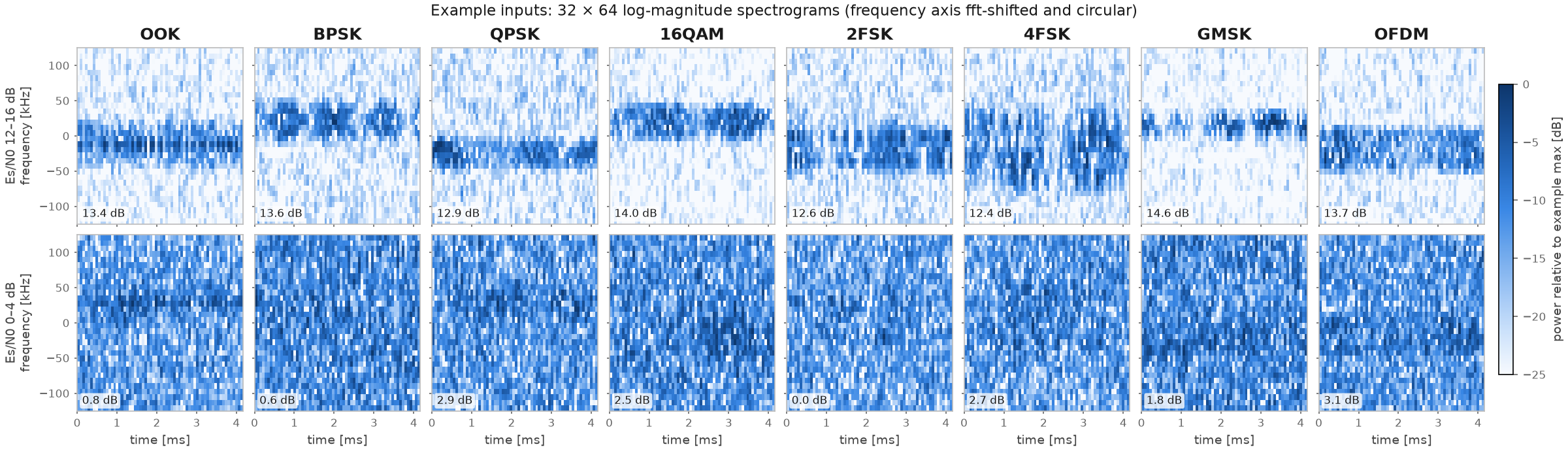
Figure 1: One training example per class. Top row: Es/N0 12–16 dB. Bottom row: Es/N0 0–4 dB. Each panel is one model input, shown relative to its own maximum.
2. The data
2.1 How the signals were made
The signals are synthetic but physically realistic. A transmitter on a 5.9 GHz carrier sends one of the 8 modulations, at a random symbol rate of about 31–62 kBd and with randomised pulse shaping. The signal then passes through a realistic link:
- Fading: time-varying multipath fading (Rician or Rayleigh), from a receiver moving at up to 120 km/h.
- Receiver errors: a carrier frequency offset of up to a few frequency bins, phase noise, symbol-timing and sample-clock offsets, IQ imbalance and a DC offset.
- Noise: additive white Gaussian noise at a per-example Es/N0 drawn uniformly from −4 dB to 16 dB, so many examples are very noisy.
The receiver samples complex baseband at 250 kS/s and records 1040 samples (4.16 ms). It normalises the power to a mean of 1 and computes the spectrogram:
- STFT: 32-point Hann window, hop 16 samples, 64 frames, two-sided.
- Value:
10·log10(|X|²)in dB, stored as float16.
2.2 The input array
Each example x[i] is a 32 × 64 array of dB values.
| Axis | Size | Meaning |
|---|---|---|
| 0: frequency | 32 | row k is frequency (k − 16) × 7.8125 kHz, from −125 kHz (row 0) through 0 Hz (row 16) to +117.2 kHz (row 31) |
| 1: time | 64 | frame t starts at t × 64 µs; frames overlap by half |
The frequency axis is circular. FFT bins wrap around, so row 31 and row 0 are neighbours (+117.2 kHz is next to −125 kHz).
2.3 Files
The files are uploaded on Github. See the details below.
| File | Examples | Contents |
|---|---|---|
train.npz |
40,000 (5,000 per class) | x, y, classes, snr_db, sps, k_db, speed_kmh |
val.npz |
8,000 (1,000 per class) | same fields |
| Field | Shape, dtype | Meaning |
|---|---|---|
x |
(N, 32, 64) float16 | the spectrogram in dB: the only model input |
y |
(N,) int64 | class label 0–7 (table in §1) |
classes |
(8,) str | class names in label order |
snr_db |
(N,) float32 | Es/N0 of the example in dB |
sps |
(N,) float32 | samples per symbol (4–8) |
k_db |
(N,) float32 | Rician K-factor in dB; -inf means pure Rayleigh fading |
speed_kmh |
(N,) float32 | receiver speed in km/h |
Load the data with d = np.load("train.npz"), then use d["x"], d["y"] and so on.
The metadata fields (snr_db, sps, k_db, speed_kmh) may be used during training, if required. However, they are not available to the model at test time.
2.4 Test data (not distributed)
The organisers hold 24,000 test examples drawn from the same distribution as train.npz. They are never
released, and the organisers run your model on them:
- Public test set (8,000 examples): scores the live leaderboard during the challenge.
- Private test set (16,000 examples): decides the final ranking.
3. Model rules
3.1 Layer inventory
Your network may contain only the following learnable layers. Each item may be used at most once, and unused items are fine.
| Item | Layer | Output channels / features | Kernel |
|---|---|---|---|
| C1 | 2-D convolution | 16 | 5 × 5 |
| C2 | 2-D convolution | 32 | 3 × 3 |
| C3 | 2-D convolution | 32 | 3 × 3 |
| C4 | 2-D convolution | 64 | 3 × 3 |
| C5 | 2-D convolution | 32 | 1 × 1 |
| F1 | fully connected (linear) | 64 | – |
| F2 | fully connected (linear) | 8 | – |
Free choices for each inventory layer:
- its number of input channels or features (they follow from your wiring);
- stride, dilation, padding amount and padding mode;
- groups (grouped and depthwise convolutions are allowed);
- whether it has a bias.
The output channel count and kernel size must match the table exactly.
3.2 Parameter budget
At most 75,000 parameters, counted as every weight and bias of the inventory layers as stored in your submitted file.
Normalisation layers (BatchNorm, LayerNorm, GroupNorm, InstanceNorm) are free, as long as their affine parameters are one value per channel or feature. There is one subtlety. When you export, a BatchNorm that directly follows a convolution is usually folded into that convolution, which then gains a bias if it had none. That bias counts. Leave a few hundred parameters of headroom, or simply give your convolutions a bias. The checker prints the exact count.
3.3 Allowed parameter-free building blocks
Anything without learnable parameters that keeps the network a plain feed-forward CNN is allowed:
- activations: ReLU, LeakyReLU, ELU, SELU, SiLU/Swish, GELU, Mish, sigmoid, tanh, hard-sigmoid/swish, clipping;
- pooling and statistics: max, average, global and adaptive pooling, and statistics such as mean, max, min, standard deviation or log-sum-exp over any axes;
- connections: skip or residual connections (addition or concatenation) and multiple branches;
- tensor operations: reshaping, flattening, transposing, padding (any mode), slicing, flipping, rolling and concatenating;
- regularisation: dropout;
- normalisation layers, as in §3.2;
- input transforms inside the model: fixed, deterministic preprocessing, including per-example statistics such as subtracting the example's mean.
3.4 Not allowed
- Extra learnable parameters or stored constant tensors of any kind outside the inventory and the per-channel normalisation parameters. This includes PReLU, learnable scales, biases or positional maps, squeeze-and-excitation blocks and lookup tables.
- Attention in any form, including parameter-free attention:
- softmax over features or positions;
- dot products or matrix products between two feature tensors;
- multiplying or dividing a feature map by another feature map computed through a different layer (gating).
- Allowed: elementwise activations of a single tensor, such as x·sigmoid(x), and normalisation by a statistic of the same tensor.
- Non-CNN layers: recurrent layers (RNN/LSTM/GRU), transformer blocks and transposed convolutions.
- Control flow, dynamic weights and weight sharing: a weight tensor may not be used by more than one layer call, and layers may not be applied repeatedly in loops.
- A softmax at the output: return raw scores (logits).
3.5 Training rules
- Train only on
train.npzandval.npz. You may use both in any way, including training onval.npz. No other data, real or synthetic. - No pretrained weights. No knowledge distillation from any other model. No ensembles: the submission is
one network.
- Averaging the weights of a single training run (EMA, SWA) is fine, because the result is still one network.
- Augmentation, optimiser, schedule, loss, regularisation and framework are your choice. The only requirement is that you can export to ONNX; the template uses PyTorch.
The organisers can verify the architecture rules (§3.1–3.4) directly from the submitted file, and they do so automatically. They cannot verify the training rules (§3.5) from your model, but can do so from the final code you submit.
4. Submission format
You submit exactly one file: your trained model as a single ONNX file, and nothing else (no code, no predictions). The ONNX file contains the network's weights and its computation graph, which is how the organisers can run it and check the rules without your code.
| Requirement | Value |
|---|---|
| File name | <team_name>.onnx |
| Format | ONNX, a single self-contained file (no external data file), at most 5 MB |
| Operators | the standard ONNX domain, opset 17–23 (export with opset_version=18) |
| Input | one tensor, float32, shape (N, 1, 32, 64) with N dynamic (or fixed to 1). The values are the raw dB values of x exactly as stored in the .npz, cast to float32 and given a channel axis: x[i][None, None].astype(np.float32) |
| Output | one tensor, float32, shape (N, 8): one score per class in label order (§1). The prediction is argmax over the 8 scores |
| Preprocessing | all inside the model. The organisers feed raw x, so any normalisation you used in training must be part of the exported network |
How the organisers run it. The model runs in onnxruntime on CPU, one example at a time (batch size 1),
so no example can influence another. Your model must give correct results with batch size 1. In particular,
call model.eval() before exporting, so BatchNorm uses its running statistics.
Check before you submit. Run the provided checker; it is the same script the organisers use:
python check_submission.py <team_name>.onnx --val val.npz
It prints the inventory layers it finds, the parameter count, PASS or FAIL with the reasons, and your
accuracy on val.npz. Submissions that do not PASS are rejected. The template notebook exports your model in
the right format and runs this check for you.
5. Evaluation and ranking
- Metric: top-1 accuracy (fraction of correctly classified examples).
- Live leaderboard: accuracy on the public test set.
- Final ranking: accuracy on the private test set. Ties are broken in this order:
- accuracy on private test examples with Es/N0 ≤ 2 dB (the hardest 30%);
- fewer parameters (the count printed by the checker);
- earlier submission time.
- Which submission counts: your last valid submission before the deadline.
For reference, the baseline in the template notebook reaches about 67% on val.npz.
6. Provided files
See this page for the necessary files.
| File | What it is |
|---|---|
PROBLEM_STATEMENT.org |
this document |
train.npz, val.npz |
the data (§2.3) |
template.ipynb |
starter notebook: loads the data, contains a baseline you replace with your own model and training, exports <team_name>.onnx and runs the checker |
check_submission.py |
the official rule checker and validation scorer (needs numpy, onnx, onnxruntime) |
class_examples.png |
the figure in §1 |
Software. Python ≥ 3.10, PyTorch ≥ 2.5, and pip install onnx onnxscript onnxruntime. A free Colab GPU
trains the baseline in a few minutes.
7. FAQ
Can I train on the validation set? Yes. Holding some data out to choose your final model is still a good idea.
Can my model use snr_db or other metadata as input?
No. The only input is the spectrogram. Metadata may be used during training only (§2.3).
Can I use torch.roll, torch.flip, circular padding, or a fixed transform of the input?
Yes. Any fixed, parameter-free operation inside the model is allowed (§3.3), as long as it adds no stored constant
tensors beyond single numbers.
My export produced a .onnx plus a .onnx.data file.
Export with external_data=False, which the template does.
The checker says a constant tensor is not allowed, but I didn't add parameters.
Some layers export stored tensors you might not expect, e.g. nn.LayerNorm over several dimensions with a
per-element affine. Normalise over a channel or feature axis only, or contact the organisers with the exact
message.
Do I need a GPU? Training is much faster on one (e.g. free Colab). Evaluation runs on CPU.